Build a reading tracker in Obsidian Bases
Keep one note per book, record the pages you have read, and see your whole bookshelf in a table with progress bars.
The setup: a Books folder, two number properties (pages_read and total_pages), and one calculated Progress column. You update the page counts; Bases updates the bar.
The bookshelf you will build
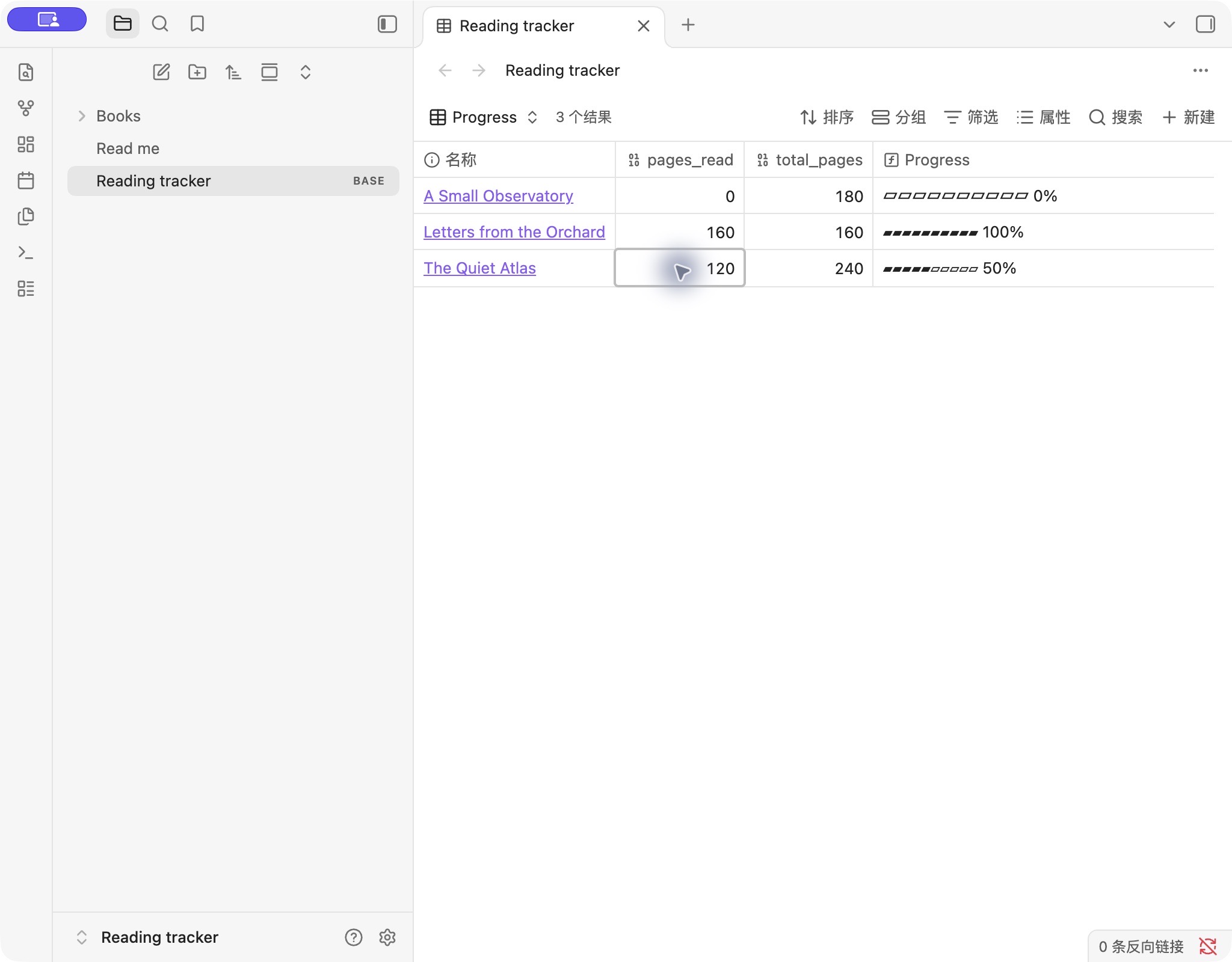
The sample uses fictional books and page counts so you can experiment before adding your own library. Here is the expected starting table:
| Book | pages_read | total_pages | Progress |
|---|---|---|---|
| The Quiet Atlas | 84 | 240 | ▰▰▰▰▱▱▱▱▱▱ 35% |
| A Small Observatory | 0 | 180 | ▱▱▱▱▱▱▱▱▱▱ 0% |
| Letters from the Orchard | 160 | 160 | ▰▰▰▰▰▰▰▰▰▰ 100% |
Each bar has ten segments, rounded to the nearest segment. The percentage label rounds separately to a whole percent, so 35% fills four segments.
Download the reading tracker (.zip) ↓
Unzip it, then use Obsidian’s vault switcher to open the extracted Reading tracker folder as a vault. Enable Bases in Settings → Core plugins if needed, and open Reading tracker.base. It contains three book notes and a ready-made table, with no community plugins or personal data.
To use it in an existing vault, copy the Books folder and Reading tracker.base into its root. Keep the folder name Books, or update the base’s folder filter. If you already have a Books folder, check the filenames before copying.
1. Create one note for each book
Create a folder called Books at the root of your vault. Inside it, create The Quiet Atlas.md. Open the note in Source mode and paste this complete example at the very beginning:
---
pages_read: 84
total_pages: 240
---

# The Quiet Atlas

## Reading notes

Write your thoughts here.
Switch back to Live Preview. The fields above the note should both have the Number type. Click the property’s type icon if you need to change it. Store 84, not 84 pages or 35%.
pages_read means the number of pages completed, and total_pages means the total for your edition. Add another note for each book. Use 0 for a book you have not started; leave a value empty only when it is unknown.
2. Make a table for your Books folder
- Open the command palette and run Bases: Create new base. Name the file
Reading tracker.base. - Keep the table view. Open Filter and limit the view to files in your
Booksfolder. The downloadable base already includes this filter. - Under Properties, show the file name,
pages_read, andtotal_pages.
Check the source values before adding a formula. If the table is empty, make sure the notes are actually inside Books. If unrelated notes appear, adjust the folder filter.
3. Add the reading progress formula
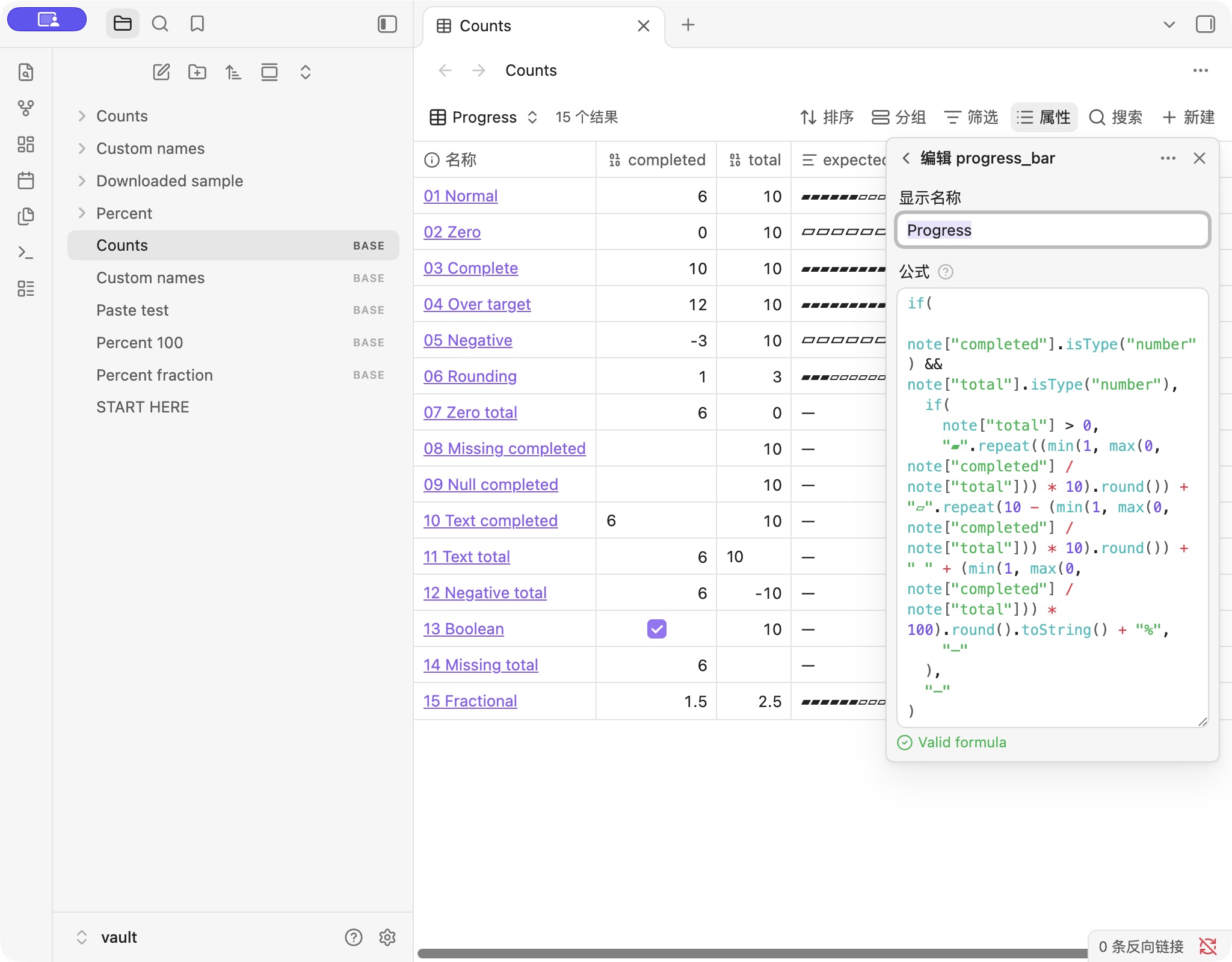
In the table toolbar, open Properties → Add formula. Name the formula progress_bar, then paste this expression into the Formula field:
if(
  note["pages_read"].isType("number") && note["total_pages"].isType("number"),
  if(
    note["total_pages"] > 0,
    "▰".repeat((min(1, max(0, note["pages_read"] / note["total_pages"])) * 10).round()) + "▱".repeat(10 - (min(1, max(0, note["pages_read"] / note["total_pages"])) * 10).round()) + " " + (min(1, max(0, note["pages_read"] / note["total_pages"])) * 100).round().toString() + "%",
    "—"
  ),
  "—"
)
Close the editor and enable the new formula column in Properties. The sample base gives this column the display name Progress.
This expression calculates pages_read / total_pages, limits the result to 0–100%, and draws a text bar. Number checks keep missing data separate from a real zero; a total of zero or less displays —.
Already use different property names? Open the generator with this reading example, replace pages_read and total_pages with your exact names, and copy the resulting formula. The generator’s preview does not connect to your vault.
4. Update a book and check the result
Open The Quiet Atlas and change pages_read from 84 to 120. Return to the base: with total_pages still at 240, Progress should show five filled segments and 50%.
After each reading session, update the number in the book note. Keep notes, quotations, or your review below its properties. Bases reads the numeric fields; this setup does not count checkboxes, inspect a PDF, or synchronize an e-reader’s position.
If your tracker looks wrong
A dash appears instead of a bar
Check both source fields. They must contain numbers, and total_pages must be greater than zero. An empty property is not the same as 0: zero pages read is valid and displays 0%.
The formula works, but no column appears
Open Properties and select the formula column. Creating a formula and showing it in the current view are separate steps.
The percentage is unexpected
Check your edition’s page count and the units. Do not mix chapters completed with total pages. For chapter tracking, use chapters for both inputs and generate a formula with the matching field names.
The bar reaches 100% before you correct an entry
Values above the total are capped at 100%; negative page counts are capped at 0%. The formula does not rewrite your notes. Correct the original number if it was a typo.
I want to sort books by completion
This bar is text, so it is not a numeric sort key. Keep a separate numeric percentage formula if you need completion sorting. Sorting the Progress text column is not a reliable percentage order.
Testing and references
The core progress formula was tested in Obsidian 1.14.5 on macOS on October 24, 2026, across 28 sample results. On October 31, 2026, we opened the downloadable reading vault in the same version, checked its 0%, 35%, and 100% examples, pasted the formula copied from this page into Bases, and confirmed that changing 84 to 120 pages updated the result to 50%. Other versions and mobile Obsidian have not been tested.
Official documentation checked October 31, 2026: creating a base, note properties, and formula properties. Screenshots and fictional sample notes are our own. Bases Helper is independent and is not affiliated with Obsidian.