LINKS & CONTEXT
Build a Linked-Note Dashboard with Obsidian Bases
Use file.hasLink(this.file) to show notes that link to the note containing your base. One reusable Base can become an Atlas project dashboard in one note and a Beacon dashboard in another.
The result: one base, two project dashboards
Suppose meeting notes and design sketches already link to their project. Instead of manually maintaining a list of those notes, embed a small table in the project note. This example shows incoming links: notes pointing to the project, not every note the project links out to.
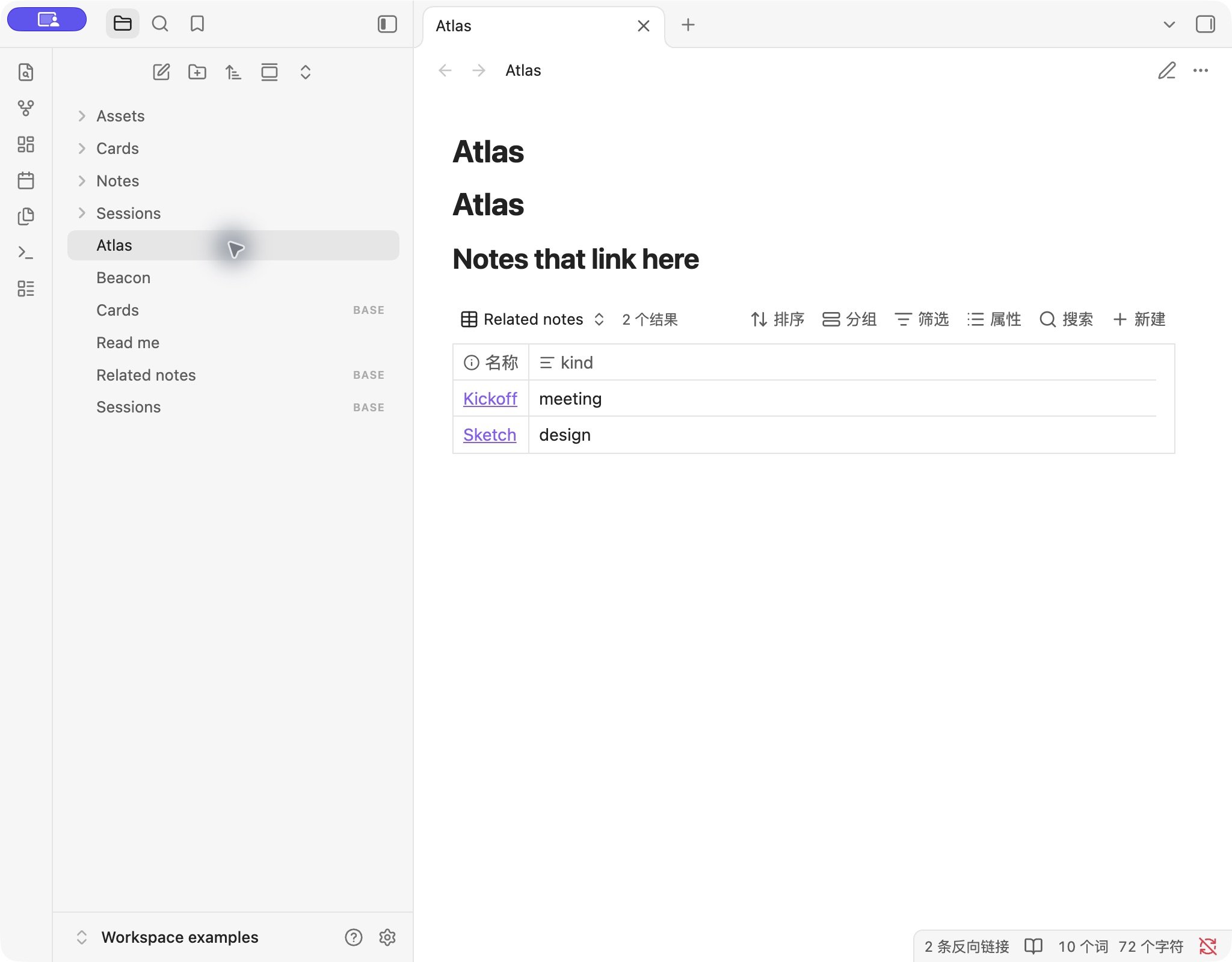
Download the workspace practice vault (.zip)Unzip it and open Workspace examples as a separate vault. Enable Bases under Settings → Core plugins if needed. Open Atlas.md in Reading view: you should see Kickoff and Sketch. Open Beacon.md: you should see Beacon review.
| Source note | Reference | Appears in |
|---|---|---|
| Kickoff | Project property links to Atlas | Atlas |
| Sketch | Body contains a link to Atlas | Atlas |
| Beacon review | Body contains a link to Beacon | Beacon |
| Plain mention | The word Atlas, without a link | Neither dashboard |
1. Create actual links to the project
Create a project note called Atlas. In a new note named Kickoff, use this source text. Paste it in Source mode so the opening YAML block becomes note properties.
---
kind: meeting
project: "[[Atlas]]"
---

# Kickoff

Discuss the first milestone.
The quoted "[[Atlas]]" is an internal link. A plain project: Atlas text value does not express the same relationship. A body link such as A draft for [[Atlas]]. also matches our example. Choose the correct target using Obsidian's link suggestions; if two notes share a name, use the full vault-relative target path.
This broad backlink approach includes links from anywhere in a candidate note. If a note mentions Atlas only incidentally, it will still appear. For a strict project-membership system, use a dedicated property-based filter instead of assuming every backlink means membership.
2. Create the reusable related-notes base
Save the following complete configuration as Related notes.base in the vault root, or copy that file from the download. It is a whole Base file, not a formula to paste into the Formula field.
filters: 'file.ext == "md" && file.hasLink(this.file) && file.path != this.file.path'
views:
  - type: table
    name: Related notes
    order:
      - file.name
      - note.kind
The filter has three parts: keep Markdown notes, require a link to the current context, and exclude the context note itself. The last check prevents a self-link from creating a redundant row. The kind column is optional descriptive metadata; it does not control inclusion.
When editing an existing base through the UI, put this expression in the advanced Filters editor:
file.ext == "md" && file.hasLink(this.file) && file.path != this.file.pathFor a workspace with unrelated material, add a collection boundary such as a folder condition. The filter guide explains how global and current-view filters combine.
3. Embed the named view in a project note
Paste this Markdown into Atlas in Source mode, then switch to Reading view or move the cursor away from the embed in Live Preview.
# Atlas

## Notes that link here

![[Related notes.base#Related notes]]
The text after # selects the view named Related notes. Copy the same embed into Beacon. You do not need a second Base file or a hard-coded Atlas filter.
Why the bare Base can look empty: file is the candidate row; this.file is the context. When you open the Base directly in the main area, the context is the Base itself. When it is embedded in Atlas, the context is Atlas. Test this workflow from the project note.
When a related note is missing
- Check the direction. The source note must link to the project. A project linking to the source note is the reverse relationship.
- Check for a real link. A plain word, an unlinked mention, or a similarly named target will not match this link test.
- Check the context. Open the embedding project note. Confirm that the displayed table belongs to that note rather than a separately opened Base.
- Check the remaining filters. A folder or status rule elsewhere can exclude a linked note.
- Check the embed name. Keep the file and view names aligned after renaming. Select the intended view if an old embed points elsewhere.
This guide does not implement an outgoing-links list, a relation editor, or an automatic rollup of properties across linked notes. It gives you a reusable incoming-links table with each matching note's own properties.
Testing and references
On November 1, 2026, we opened this synthetic vault in Obsidian 1.14.5 on macOS. Atlas showed Kickoff and Sketch, including a frontmatter link and a body link. Beacon showed Beacon review using the same embedded Base. The plain-text mention did not appear. Other versions, mobile, nested embeds, and sidebar context were not tested.
Technical references: Bases syntax and the context of this, file.hasLink(), and embedding a named Base view. See our testing method.